Lives inside Premiere Pro and speaks 99 languages — including the ones Adobe forgot. Runs 100% offline on your own Mac or Windows.
Take the plugin for three days first — every model, every language, real subtitles in your own timeline. No card, no account. Your 3 days don't start until your first transcription. The $39 launch price runs until 1 November — after that it's $59.
💸 Or get it 25–50% cheaper by sharing it →Adobe not having a Ukrainian option was such a pain — up until now we literally had someone transcribing by hand. It already feels like a lifesaver.
It has many languages that Premiere doesn't natively offer, and it can work offline if you have sensitive footage.
Worth every single cent — it's honestly 100/10. I'll definitely recommend it to my friends.
New in 1.0.6
Editors were deleting full stops by hand after every job. Now it is a switch in the panel — flip Remove punctuation below and the captions rebuild as you watch, without a single in or out point moving. Move Max words too: these are the real controls, running the real grouping rules.
Set 3 and a caption will be 3, 2 or even 1 word when that is where the line logically ends. It is never 4.
Removing punctuation changes the text only. Every in and out point stays exactly where it was.
A plain .srt with the language in its name, imported straight into the Premiere project panel.
Type it in. You'll know in one second.
I'm a producer at a Ukrainian production company — honestly, it already feels like a lifesaver. Adobe not having a Ukrainian option was such a pain; up until now we literally had someone transcribing videos by hand. This tool does the whole thing right inside Premiere, and it's fast. The whole editing team is already on board.
"This plugin is quite amazing. It has many languages that Premiere doesn't natively offer, and it can work offline if you have sensitive footage. The developer, Igor, is very accessible for any trouble-shooting."
"This plugin is worth every single cent — it's honestly 100/10! I'll definitely recommend it to my friends because it's such an incredibly useful tool. ❤️"
"CaptionLab has become an essential part of my editing workflow. The transcription is impressively accurate, the Premiere Pro integration is smooth, and the whole experience feels polished and intuitive."
"I tried CaptionLab for Ukrainian and it works great! Developer (Igor) is also very responsive. Highly recommend."
"Offline subtitles at this price point are honestly a no-brainer for editors who care about client footage security."
Every language OpenAI Whisper supports. Not 16. Not 27. Ninety-nine.
Pick yours. Or one of 90 more. CaptionLab speaks them all.
+ 50 more — Afrikaans, Albanian, Amharic, Basque, Catalan, Galician, Welsh, Yoruba, Sanskrit, Tibetan, Maltese, Hawaiian, and dozens more.
If you're reading any of these — yes, CaptionLab is for you.
If you edit video in a language Adobe ignores, every project starts with the same dread.
3 to 5 hours of manual subtitling for every hour of footage. Time you'll never get back.
Adobe's Speech-to-Text works great — if you speak one of 16 languages. Yours isn't one of them.
Creative Cloud. Spotify. Netflix. ChatGPT. Every tool wants $15/month — forever.
Cloud tools send your confidential footage to servers you don't control. NDA? What NDA?
All of this — fixable in 60 seconds.
See how it works ↓No tracking links, no forms. Post something real, email me proof, get a code back.
Post about it on Reddit, Adobe Community, AlternativeTo, or ProductHunt — any one of them.
A public video where you actually use it — YouTube, TikTok, Instagram, anywhere.
No export. No upload. No waiting for a server. Open the panel and go.
▶ Watch it in action 60-second walkthrough, real timeline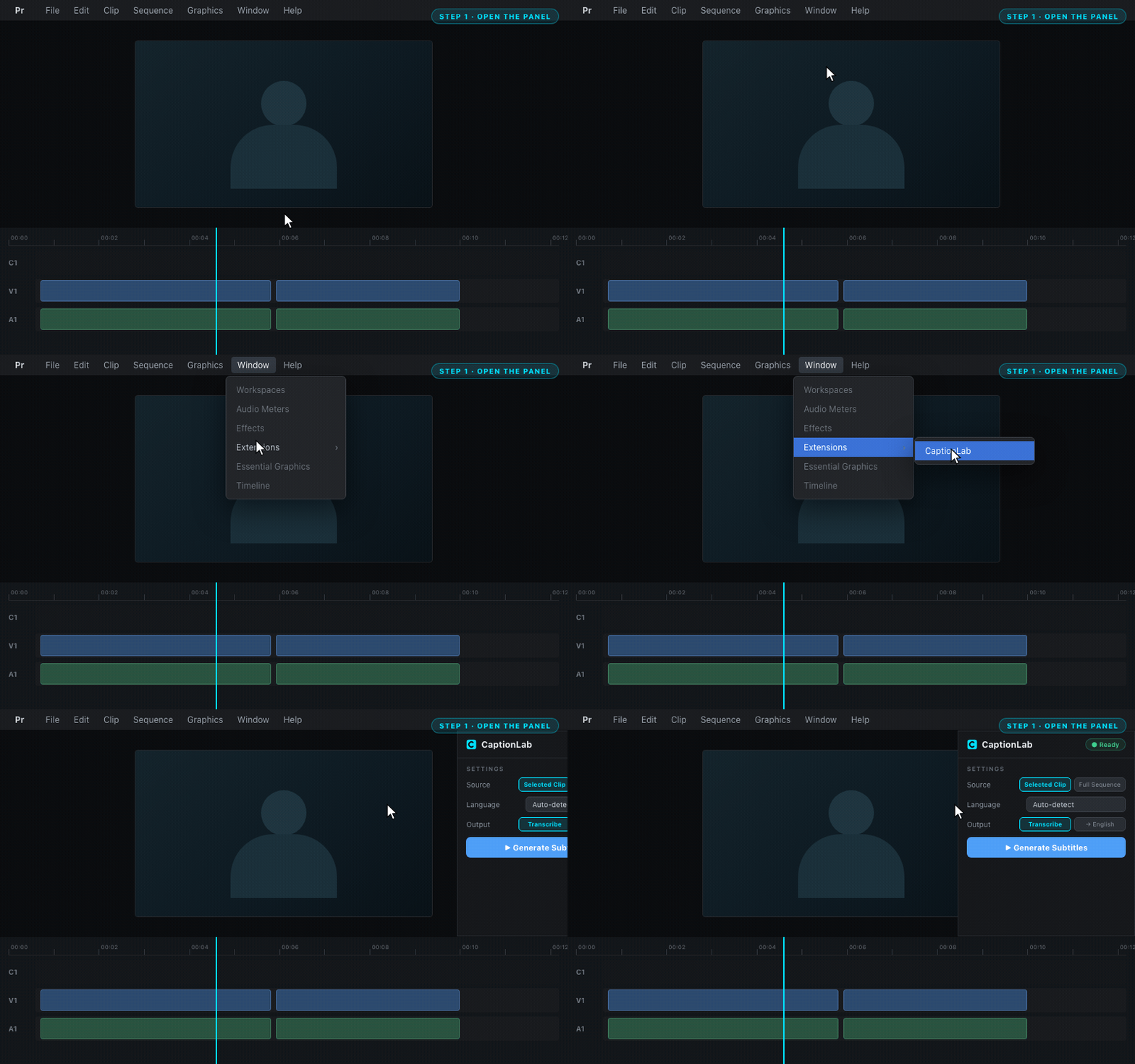
CaptionLab lives right inside Premiere Pro. Window → Extensions → CaptionLab.
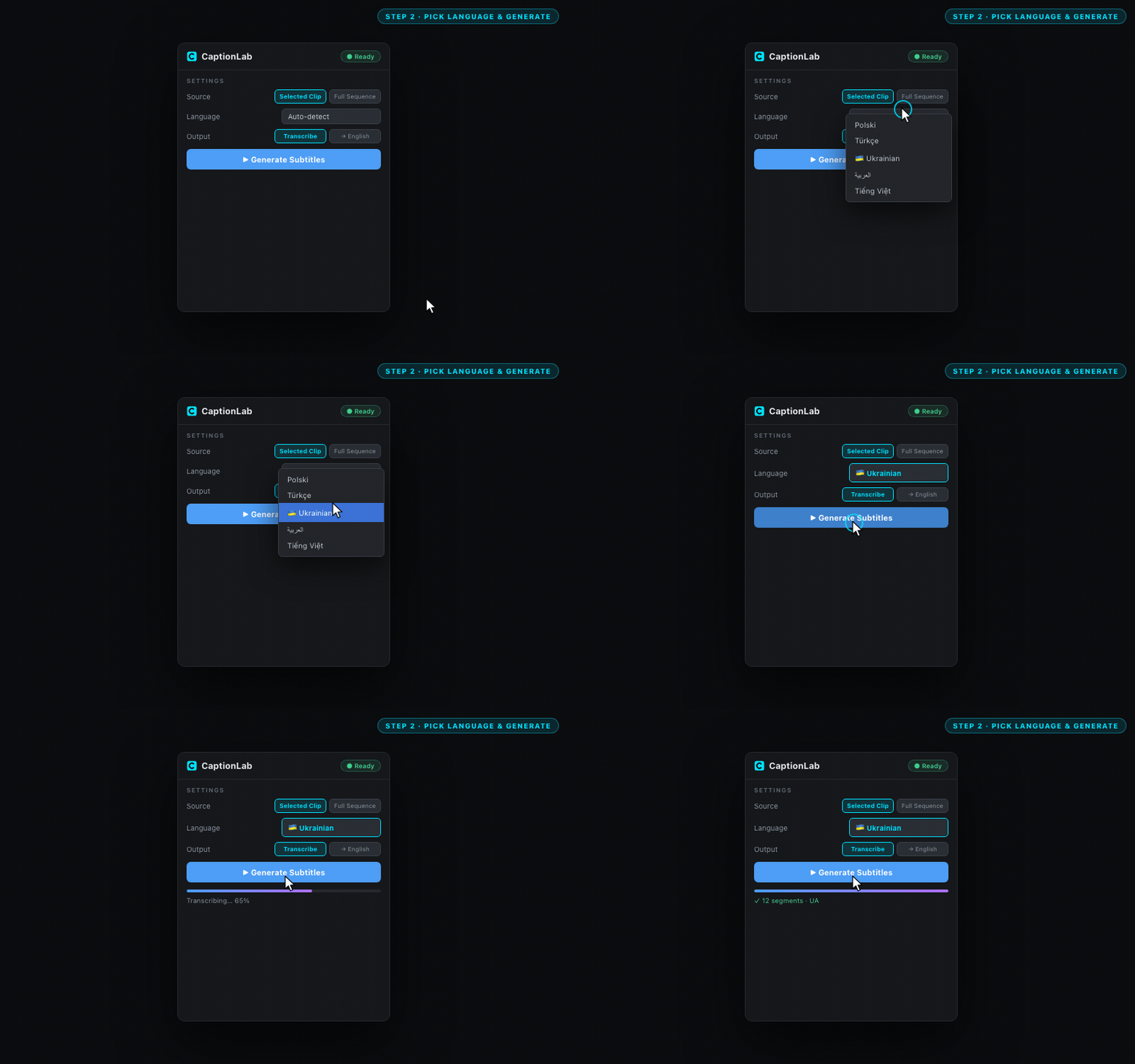
Choose from 99 languages — or let it auto-detect. One click does it all.
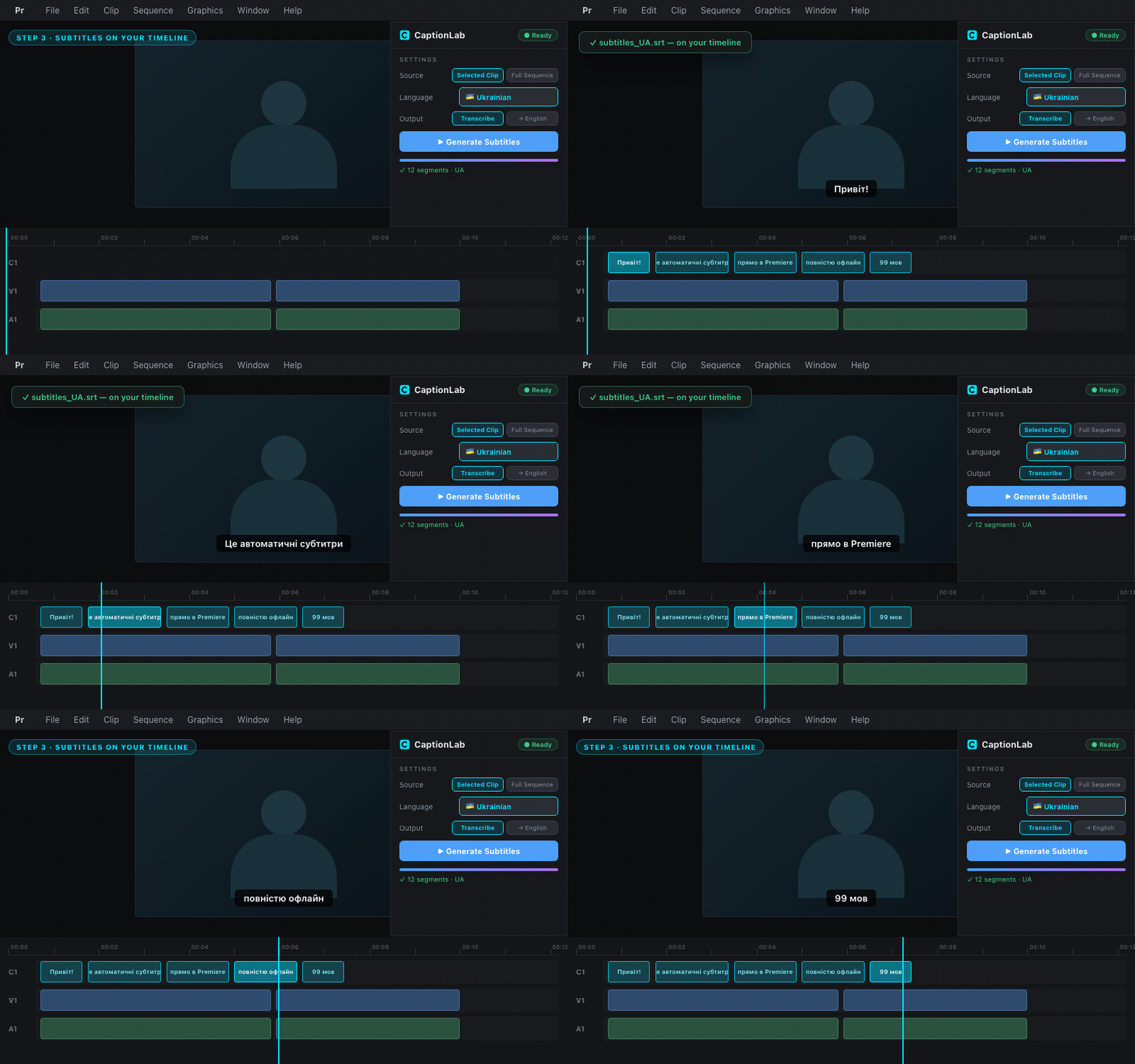
Subtitles appear as an editable Premiere caption track. Tweak and ship.
We did the research so you don't have to.
| Feature | Adobe built-in | Cloud tools | CaptionLab |
|---|---|---|---|
| Languages | ~16 | 99 | 99 |
| Runs offline | ✗ cloud | ✗ cloud | ✓ local |
| API key required | ✗ | ✗ yes | ✓ none |
| Footage stays private | ✗ | ✗ | ✓ always |
| Pricing | $55/mo CC | $15/mo+ | $59$39 once |
| Subscription | ✗ required | ✗ required | ✓ never |
| Per-minute fees / caps | none | ✗ metered | ✓ unlimited |
This is why CaptionLab is $39 once — not $15/month forever.
Try it free →I'm an editor. Same as you.
For years I watched Adobe roll out Speech-to-Text in English, then Spanish, then French — and then just stop. My Ukrainian projects? Polish? Turkish? "Not supported." So I typed every subtitle by hand. Hours and hours, for every project.
Then I tried the cloud tools. They worked — but they wanted my footage on their servers, my credit card on file, and $15 every month forever. For client work under NDA? No way.
So I built CaptionLab. The plugin I wanted to exist. Local. Fast. 99 languages. One price. No subscription. Your footage stays where it belongs — on your own computer.
If this sounds like something you need too — try it. Three days free, on your own footage, before you pay a thing.

Yes. After the one-time setup, no internet needed. Your audio never leaves your computer.
Works on any Mac with macOS 11+ (Apple Silicon or Intel) or Windows 10/11 — with optional NVIDIA GPU acceleration on Windows.
Then don't buy it. Run the free 3-day trial first and find out on your own footage.
No tiers. No upsells. No catch.
Premiere Pro 2022–2026 · macOS & Windows
One key for an agreed number of computers. Students and staff just open Premiere and transcribe — no accounts, no activation screen, nothing to enter. The AI engine installs once per machine rather than once per person.
Accuracy differs a lot from one language to the next. If yours is one Adobe doesn't support, three days on your own footage will tell you more than any demo can.
The complete plugin — every model, every language, real subtitles in your timeline. No card, no account. You get your key first, then install at your own pace: your 3 days only start at your first transcription, so downloading the plugin and its AI model costs you nothing.
Already know it's what you need? Skip the trial. One payment, yours forever — no subscription, no per-minute fees, and it keeps working offline on two computers.
Buy once. Use forever.
Get CaptionLab →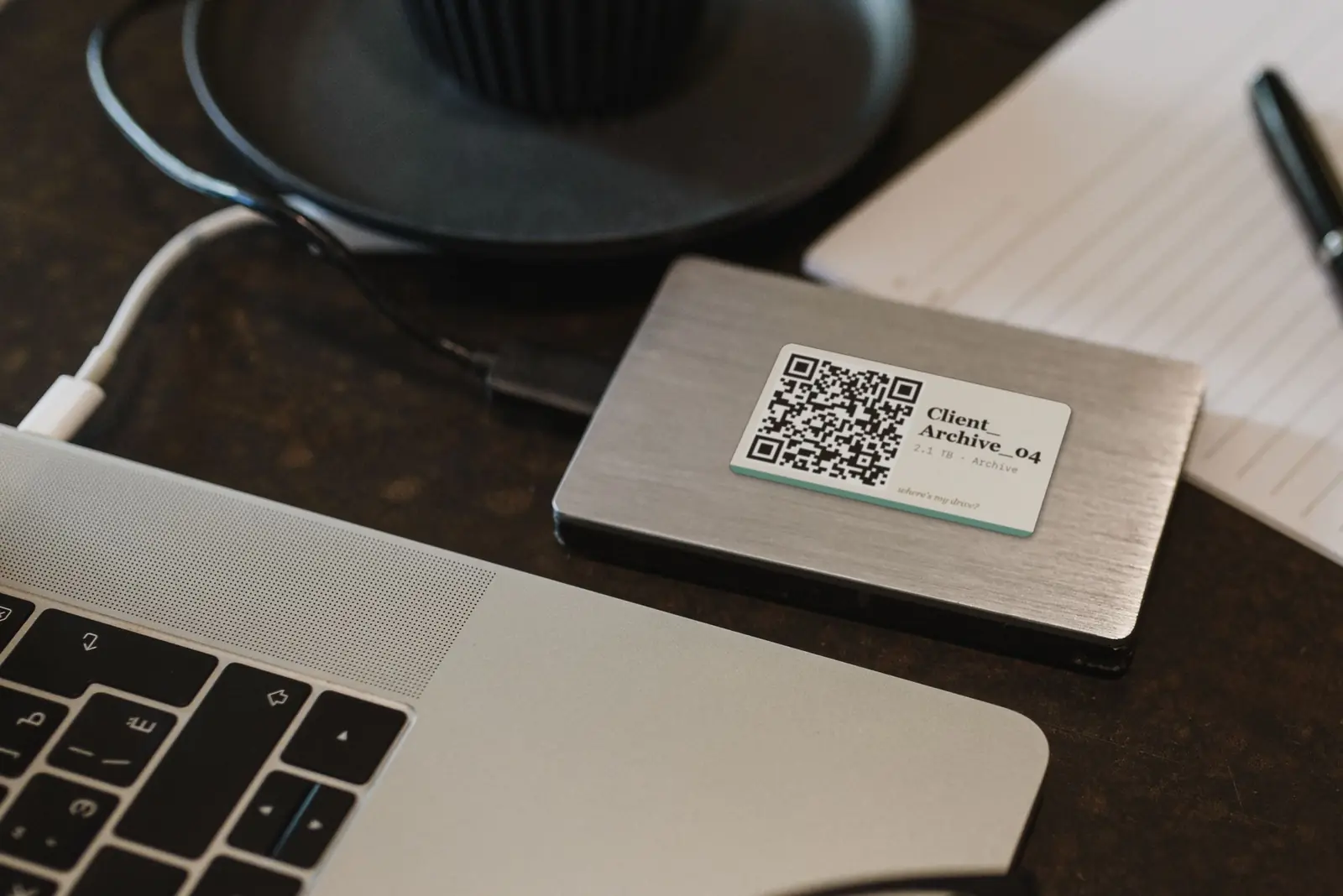
Where's My Drive catalogs every file on your external drives and puts a QR sticker on each one. Scan the sticker with your phone and see what's on the drive — without plugging it in. Search every drive at once, even the unplugged ones.
 See how it works →
Last updated: August 2026 · Edit Lab Tools
By purchasing or installing CaptionLab ("the Software"), you agree to these Terms. If you do not agree, do not install or use the Software.
Edit Lab Tools grants you a non-exclusive, non-transferable, personal license to install and use CaptionLab on up to two (2) computers — Mac or Windows — that you personally own or control. This is a single-user license: the license is tied to you, not to a team, studio or organisation. Each additional user requires their own license.
You may not share, resell, redistribute, sublicense or publish the Software, your license key, or the installation files. Activating on a computer you do not own or control, or sharing your key with another person, terminates this license.
CaptionLab is offered with a free 3-day trial. The trial period begins at your first successful transcription, not at download or activation. The trial is limited to one per person and one per computer, and is provided for the sole purpose of evaluating the Software before purchase.
The trial is provided as-is, with no warranty of any kind. We may modify, suspend or discontinue the trial at any time, and may decline or revoke a trial where we detect abuse, including attempts to obtain repeated trials on the same computer or by the same person. Trial keys may not be shared, sold or published.
You may not: (a) reverse engineer or decompile the Software; (b) redistribute or resell it; (c) remove copyright notices; (d) use it to build a competing product.
The CaptionLab platform, brand, and codebase — and all intellectual property rights in the Software — remain the exclusive property of Edit Lab Tools. This license does not transfer ownership, and none of it may be copied, reproduced, or redistributed without permission.
You retain full ownership of your footage, audio, transcripts, and any other content you process with CaptionLab. Edit Lab Tools does not claim ownership over your files or the subtitles CaptionLab generates for you — and since all processing happens locally on your own computer, we never receive or have access to that content in the first place.
CaptionLab uses open-source components including OpenAI Whisper (MIT), faster-whisper (MIT), Flask (BSD), ffmpeg (LGPL/GPL), and Python (PSF). On Apple Silicon Macs, mlx-whisper (MIT) is used instead of faster-whisper. On Windows with an NVIDIA GPU, small CUDA runtime libraries (nvidia-cublas-cu12, nvidia-cudnn-cu12 — NVIDIA's proprietary redistributable license) are also installed to speed up transcription. AI models are downloaded from HuggingFace at first launch under their respective licenses.
You are entitled to all minor updates (v1.x) for the version you purchased. Major version upgrades may require an additional purchase.
THE SOFTWARE IS PROVIDED "AS IS" WITHOUT WARRANTY OF ANY KIND. EDITLAB DOES NOT WARRANT THAT THE SOFTWARE WILL BE ERROR-FREE OR UNINTERRUPTED.
IN NO EVENT SHALL EDITLAB BE LIABLE FOR ANY INDIRECT, INCIDENTAL, OR CONSEQUENTIAL DAMAGES ARISING FROM USE OF THE SOFTWARE. TOTAL LIABILITY SHALL NOT EXCEED THE AMOUNT PAID FOR THE SOFTWARE.
This license is effective until terminated. It terminates automatically if you breach any term. Upon termination, you must uninstall and delete all copies.
These Terms are governed by the laws of Ukraine. Disputes shall be resolved through good-faith negotiation; failing that, through the courts of Ukraine.
Questions: editlabtools@gmail.com · captionlab.pro
Last updated: August 2026 · Edit Lab Tools
CaptionLab is designed for privacy. All audio processing happens locally on your own computer (Mac or Windows). Your footage, audio, and transcripts are never uploaded to Edit Lab Tools or any third party.
We do not collect, store, or transmit: your audio or video files; transcripts or subtitles generated by the plugin; your Premiere Pro project data; the names or contents of your projects; or any record of what you transcribe.
To operate licensing and the free trial, the plugin contacts our licensing server and sends only:
These requests carry no information about your media. Licence re-checks occur periodically; between them, the plugin runs fully offline.
If you request a free trial, we store your email address, the trial key, your machine identifier and the dates the trial was issued, activated and started. We use this to issue and validate your key, prevent duplicate trials, and send you the key itself plus one email when the trial ends. Trial records are retained for up to 400 days. You may request deletion at any time.
Payment is processed by Paddle.com Market Limited ("Paddle"), who acts as the Merchant of Record. Paddle collects your name, email address, billing country and payment information — we never receive or store your card details. Edit Lab Tools receives your email address and order details from Paddle in order to deliver the product, validate your licence and provide support. See paddle.com/legal/privacy.
Downloads are served through our own server, which records the date, the platform (Mac or Windows), the country reported by our CDN, the referring page and the browser user-agent string. Your IP address is not stored: it is combined with a secret salt, hashed, and the hash is kept for 24 hours purely to tell repeat downloads apart from new ones. These records are aggregate statistics and are retained for up to 400 days.
This website uses Google Analytics to measure traffic and understand which pages people find useful. It sets cookies and may collect your IP address, device and browser information, and the pages you visit. We use no advertising or social-media tracking pixels on this site. This applies to the website only — the plugin itself contains no analytics of any kind.
You can block this through your browser settings or an ad blocker; the website works normally without it. For details, see Google's privacy policy.
We use your email address to deliver your purchase or trial key, provide support, and send service messages directly related to your purchase or trial — including a single notice when a trial ends. We may occasionally contact people who started a checkout or a trial about substantial product changes. Every such email includes a one-click way to stop them, and we honour it permanently. We never sell or share your email address with third parties.
We retain your email and order information for as long as necessary to provide support, licence validation and re-download access. Trial and download records are retained for up to 400 days. You may request deletion at any time by emailing editlabtools@gmail.com.
You have the right to access, correct, export, or delete your personal data, to object to processing, and to lodge a complaint with your local data protection authority. Contact us at editlabtools@gmail.com to exercise these rights; we respond within 30 days.
CaptionLab is not directed at children under 16. We do not knowingly collect data from minors.
Privacy questions: editlabtools@gmail.com
Last updated: August 2026 · Edit Lab Tools
CaptionLab includes a free 3-day trial: every model, every language, unlimited subtitles on your own footage. No card, no account, no feature limits. The trial exists so you can verify that CaptionLab handles your language, your audio and your workflow before any money changes hands. It is the intended and only evaluation period. A refund is not a substitute for it.
CaptionLab is digital content delivered immediately upon purchase. When you complete checkout you expressly consent to immediate delivery and acknowledge that, once the download begins, the statutory 14-day right of withdrawal no longer applies. This is set out in the Paddle Buyer Terms you accept at checkout and in section 2.2.4 of the Paddle Refund Policy.
In plain terms: once you have downloaded, installed or used CaptionLab, you are no longer entitled to a refund as of right. Any refund from that point is granted at our discretion, on the limited grounds below.
We issue a full refund, within 14 days of purchase, in these specific cases:
Requests must reach us within 14 days of the purchase date. After 14 days, refunds are limited to a demonstrable product defect as described below.
The following are not grounds for a refund, at any point:
Beyond 14 days, a refund requires a genuine, reproducible product defect: CaptionLab fails to install, activate, or run on a supported system, we are able to reproduce the fault, and we cannot fix it within a reasonable period. Dissatisfaction with transcription output is not a defect.
Email editlabtools@gmail.com with your order number (in your purchase confirmation email), your operating system and Premiere Pro version, and a description of the problem. We reply to every request. Where a refund is due, we process it within 3–5 business days to your original payment method via Paddle.
Please contact us before disputing a charge with your bank. A chargeback suspends your licence immediately and is slower for you than emailing us.
Nothing in this policy removes rights you hold under mandatory consumer law in your country. Where such law grants you more than this policy does, that law prevails. Paddle.com is the Merchant of Record for all orders and reviews refund requests under its own Refund Policy.
Refund requests: editlabtools@gmail.com
Please include your order number and a brief description of the issue.